Jekyll2020-07-11T10:09:07+00:00https://example.github.io/Alexey SiretskiyWrite an awesome description for your new site here. You can edit this line in _config.yml. It will appear in your document head meta (for Google search results) and in your feed.xml site description.Cluster monitoring2018-07-24T00:00:00+00:002018-07-24T00:00:00+00:00https://example.github.io/2018/07/24/project-6<p>On-premise solution for monitoring isolated clusters been established.
The various metrics from every node is collected with the <code>collectd</code> package, which sending the data to the <code>Grafana</code> monitoring server, where
the data is being stored in the <code>influxdb</code> to be displayed with <code>Grafana</code>.</p>
<p>The firewall rules were enabled to allow static routing on <code>UPD 25826</code> port to make possible for isolated clusters to communicate with the monitoring server.</p>
<p>Also <code>Grafana</code> was configured to send alerting messages to the dedicated <code>Slack</code> channel in the case of potential node health issues in real time.
The messages could be configured to be sent to different devices – smartphone or desktop.</p>On-premise solution for monitoring isolated clusters been established. The various metrics from every node is collected with the collectd package, which sending the data to the Grafana monitoring server, where the data is being stored in the influxdb to be displayed with Grafana.web-server development2018-03-28T00:00:00+00:002018-03-28T00:00:00+00:00https://example.github.io/2018/03/28/project-5<p>I have been involved in development and support of both types of Web Servers – dynamic and static.</p>
<p>The former involves from big projects with Django as CMS with University HPC cluster as the backend, and small web-apps powered by Flask.</p>
<ol>
<li>webserver for Protein Simulation <a href="http://gpcr-modsim.org">GPCR-MODSIM</a></li>
<li>internal Flask apps</li>
</ol>
<p>The latter involves the Jekyll-generated websites:</p>
<ol>
<li>Combient AB <a href="https://combient.com">website</a></li>
<li><a href="http://siretskiy.org">personal webpage</a></li>
</ol>I have been involved in development and support of both types of Web Servers – dynamic and static.ReadTheDocs setup2018-03-24T00:00:00+00:002018-03-24T00:00:00+00:00https://example.github.io/2018/03/24/project-4<p>The <a href="https://readthedocs.org">ReadTheDocs</a> is online service which allows to host docs for free. But what if the docs are for internal use or describing the commercial project?</p>
<p>Here comes the localized or forked version of ReadTheDocs!
It gives all the advantages but keep your code and docs in private, allowing access only from the inside the company’s network.</p>The ReadTheDocs is online service which allows to host docs for free. But what if the docs are for internal use or describing the commercial project?VPN-accessed cluster factory2018-03-24T00:00:00+00:002018-03-24T00:00:00+00:00https://example.github.io/2018/03/24/project-3<p>Sometimes public cloud is not a decent solution for your needs.
When instead a bunch of on-premises clusters could be an option.</p>
<p>The distinguished features are:</p>
<ol>
<li>
<p>the clusters, being on different <code>VLAN</code>s, are isolated from each other by default. However, that could be tuned immediately by changing the rules on the firewall.
This allows to scale up and down the cluster, but in a <strong>blob</strong> manner, which is not an option for most of public clouds</p>
</li>
<li>
<p>the local DNS service is enabled for all the clusters globally. The <code>cron</code> job performs scheduled scans of clusters, creating a global DNS table, served by <code>DNSmasq</code>. So when allowed all the hosts on all clusters can talk to each other by names, not IPs.</p>
</li>
<li>
<p>the provision of the nodes is done through PXE-booting with <code>Cobbler</code> using the local mirror for Linux distributions and packages</p>
</li>
<li>
<p>the remote access is established via secure VPN connection</p>
</li>
</ol>
<p>The clusters are being established and provisioned in a largely automatic manner, which leads to reproducibility and fast deployment time.</p>Sometimes public cloud is not a decent solution for your needs. When instead a bunch of on-premises clusters could be an option.Open Nebula setup2018-03-23T00:00:00+00:002018-03-23T00:00:00+00:00https://example.github.io/2018/03/23/project-1<p>The <a href="https://opennebula.org">Open Nebula</a> is a solid approach to orchestrate a bunch of virtual machines (VMs).
Cloud helps to create and provision VMs carrying the needed services, which are, perhaps,
not very suitable for running in Docker containers.</p>
<!-- {:class="img-responsive"} -->
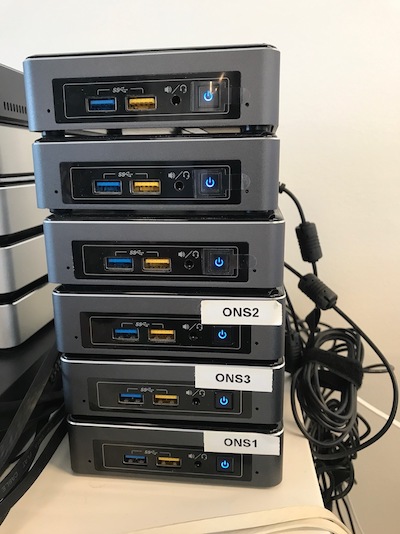
<p>The setup is built on Intel NUCs and configured to operate in Highly Available mode with 3 front-ends,
meaning that the service functionality will remain, even:</p>
<ol>
<li>if one of the front-ends degrades</li>
<li>the worker NUC or the VM running inside will fail</li>
</ol>
<p>The storage is NFS-attached from the Synology NAS solution (RAID5).</p>The Open Nebula is a solid approach to orchestrate a bunch of virtual machines (VMs). Cloud helps to create and provision VMs carrying the needed services, which are, perhaps, not very suitable for running in Docker containers.Hadoop setup2018-03-21T00:00:00+00:002018-03-21T00:00:00+00:00https://example.github.io/2018/03/21/project-2<p>Hadoop/Spark cluster (50 CPU cores/200 GB RAM/ 40 TB disk space) is suitable for solving medium size tasks in Data Science, Bioinformatics and similar data intensive domains.</p>
<p>Neglecting a separate fat (128 GB RAM, 20 cores) node, the cluster setup is pretty compact, and can reside on the desk, still demanding less then 1 kW of energy and being reasonably quite even under the high load.</p>
<p>The cluster expansion is easy due to user-friendly Apache Ambari.
The NUCs are supplied with 1 Gbit NIC, so USB3-connected HDDs are not the performance bottleneck. The portable HDDs, even not providing the top performance, are truly easy to change and add new ones, reaching 80-100 TB.</p>
<p>Spark is being utilized by the Machine Learning tasks. The <a href="http://jupyter.org">Jupyter</a> web-based Notebook is running on the fat node and used for coding. The jobs can be:</p>
<ol>
<li>submitted to run on the cluster</li>
<li>running locally on the fat node</li>
</ol>
<p>The Jupyter kernel is configured so that the Spark driver resides on the fat node with 128 GB RAM, helping Data Scientists make interactive analysis in the Jupyter notebook.</p>Hadoop/Spark cluster (50 CPU cores/200 GB RAM/ 40 TB disk space) is suitable for solving medium size tasks in Data Science, Bioinformatics and similar data intensive domains.